
Apps
Best Habitify Alternatives: 7 Habit Trackers, Checked
Looking for Habitify alternatives? Seven habit trackers compared on price, free tier, platforms, privacy and accounts, with who each one suits best.

The best Habitify alternatives depend on why you’re leaving. If it’s the price, Loop Habit Tracker and Table Habit are free. If it’s privacy, habitual, Streaks, Loop and Table Habit work without an account. If you want more than habits, TickTick adds tasks and a calendar, and Habitica turns it all into a game.
Habitify is a good app with real strengths, and we’ll say what they are. But its free plan is small, and some long-time users have grown frustrated with it. Below are seven alternatives, checked against their own websites and store listings, with who each one suits.
Habitify alternatives at a glance
| App | Best for | Platforms | Pricing model | Account needed? |
|---|---|---|---|---|
| habitual | Privacy, goals that count up | iPhone, Android | Free, with an optional Plus upgrade | No |
| Streaks | iPhone and Apple Watch users | Apple devices only | One-time purchase | No |
| Loop Habit Tracker | Free and open source on Android | Android only | Free | No |
| Table Habit | Free on every platform | iPhone, Android, Mac, Windows, Linux | Free | No |
| HabitNow | Habits plus to-dos on Android | Android only | Free, one-time premium upgrade | Optional |
| TickTick | Habits inside a task manager | iPhone, Android, web, desktop | Free, with a subscription | Not stated |
| Habitica | Turning habits into a game | iPhone, Android, web | Free, with in-app purchases | Not stated |
| Habitify (for reference) | Integrations and many devices | iPhone, Android, Mac, web, watches | Free, with a subscription or one-time upgrade | No, but data is stored in its cloud |
Prices and features checked on 11 November 2026. “Not stated” means we couldn’t find a clear answer on the app’s own pages.
Why people look for a Habitify alternative
To see why people leave, we read the 250 most recent reviews of Habitify on the US App Store on 11 November 2026. Most were positive: 99 gave five stars. But among the 83 one- and two-star reviews, three complaints came up again and again.
- The free plan feels small. Habitify’s pricing page lists three habits on the free plan. Many low ratings came from people who hit that limit within minutes of installing the app.
- Sync and widget bugs. Reviewers describe habits not syncing between iPhone, Mac and the web, widgets that don’t update, and Apple Health logging that doesn’t come through.
- Changes after updates. Some long-time users dislike a redesign and new prompts, such as a pop-up asking if you’re sure when you mark a habit as failed.
Privacy is a quieter reason. You can use Habitify without registering, but its privacy policy says that doesn’t mean your data stays only on your device: it stores anonymous users’ data on its cloud too, and it lists analytics services from Google and Meta.
What Habitify does well
It’s fair to say what you might miss. Habitify runs on iPhone, iPad, Mac, Apple Watch, Android, Wear OS and the web, and syncs between them. It connects to Apple Health, Google Fit, Fitbit, Strava and Screen Time, has Zapier and IFTTT automations and an API, and offers challenges with friends. If those integrations are why you use it, few of the apps below match them.
How we chose
We looked for apps that do what most people use Habitify for: tracking daily habits with reminders and some kind of history. For each one we read its official website and its App Store and Google Play listings on 11 November 2026, and recorded its platforms, pricing model, free tier, whether it needs an account and where it keeps your data. We left out anything we couldn’t confirm. This is research, not hands-on testing of every feature.
We included habitual because it’s ours and it answers two of the common complaints, but we’ve tried to place it honestly. Several apps here beat it for particular needs.
The 7 best Habitify alternatives
1. habitual: best for privacy and goals that count up
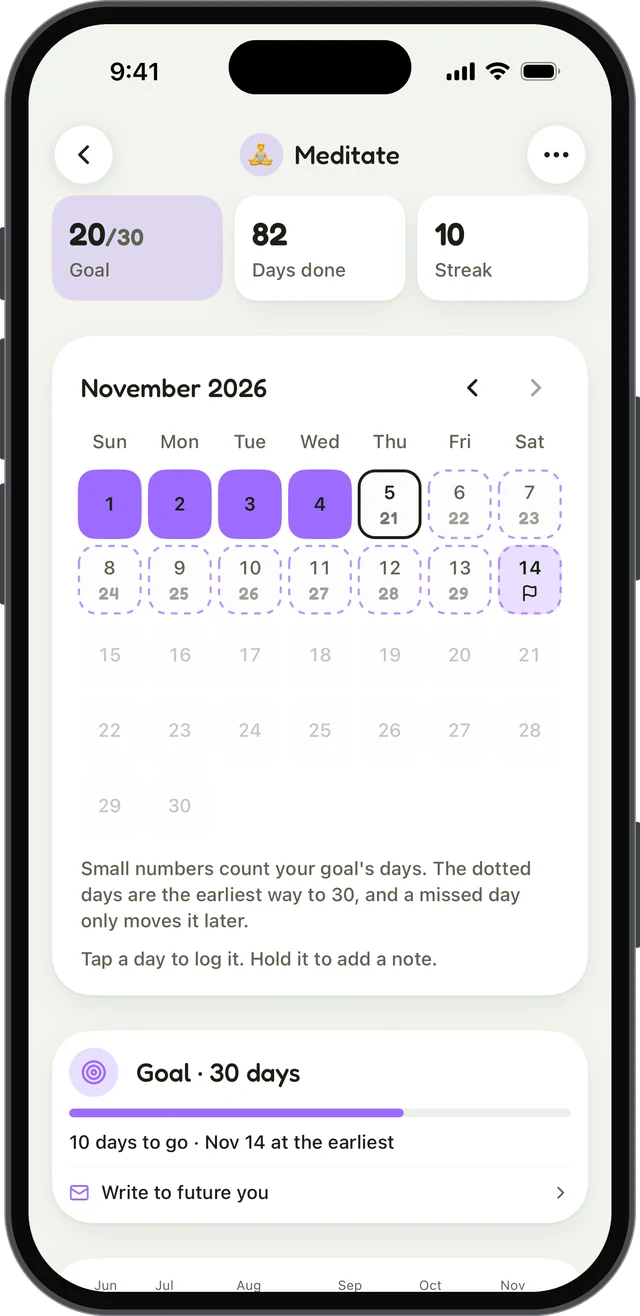
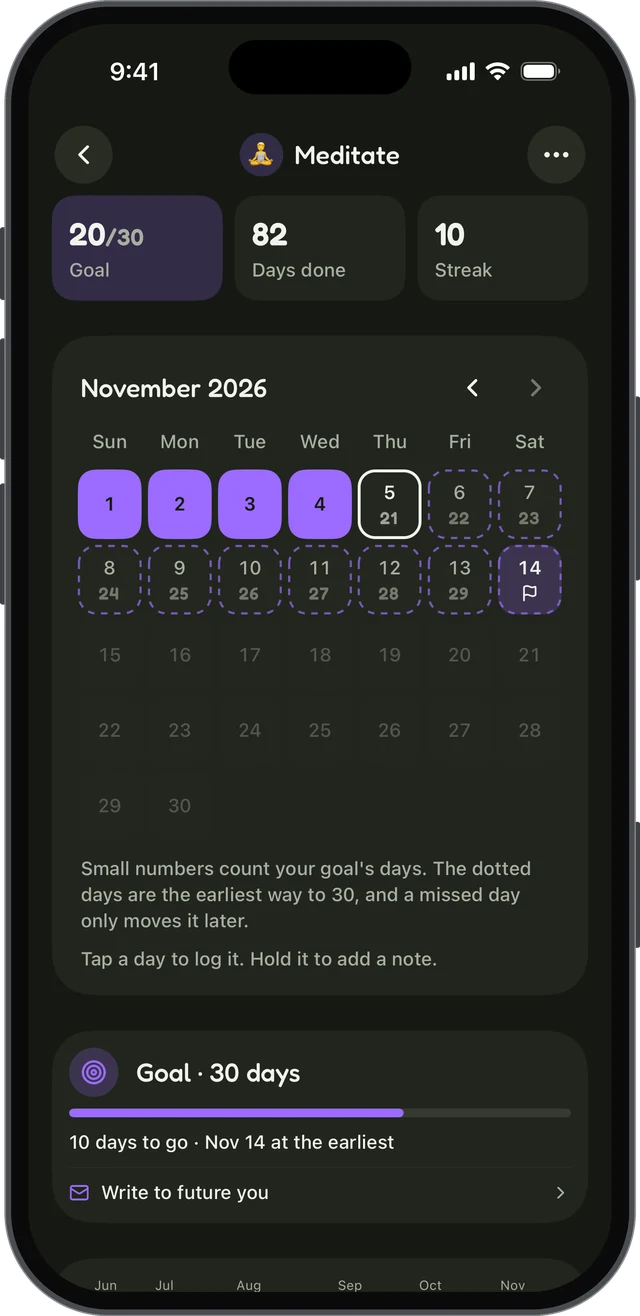
habitual is a habit tracker that keeps everything on your phone. There’s no account and no ads; habits, goals and notes live only on your device, and it works offline.
What it does well. Each habit can be counted, timed or something you’re quitting, and has its own page with a grid of the days you did it. Goals only count up: pick a number of days, like 30 or 66, and a missed day never takes days back; it only moves the finish line. You can also write letters to your future self, sealed until you reach a goal.
Drawbacks. The free version has up to 3 active habits, the same as Habitify’s free plan, though it doesn’t run out. Stats, more than three habits, and export and import are in Plus. There’s no sync between devices yet, no web or desktop app, and no health integrations.
- Platforms: iPhone, Android
- Pricing: free, with an optional Plus upgrade (yearly with a 7-day free trial, monthly, or lifetime)
- Account: not needed
If privacy is your main reason for leaving, our guide to what to look for in a private habit tracker goes further.
2. Streaks: best for iPhone and Apple Watch
Streaks is built for Apple devices: iPhone, iPad, Apple Watch, Mac and Vision Pro. It has no account, no sign-up and no ads. Your data stays on your device and syncs through your own iCloud.
What it does well. Streaks can complete habits automatically from Apple Health, which covers much of what Habitify’s health integration does. It has negative tasks for habits you’re breaking, timed tasks, widgets, Apple Watch complications and Siri shortcuts. It’s won an Apple Design Award.
Drawbacks. It’s Apple-only, so it’s no help if you use Android. It tracks up to 24 habits, and there’s no free version to try first.
- Platforms: iPhone, iPad, Apple Watch, Mac, Vision Pro
- Pricing: one-time purchase, no subscription
- Account: not needed
We compare it with habitual in more detail in Streaks vs habitual.
3. Loop Habit Tracker: best free option on Android
Loop Habit Tracker is completely free and open source, with no ads. It doesn’t need an internet connection or an account, and its privacy policy says your data is stored only on your device.
What it does well. Loop gives each habit a strength score that rises and falls with how consistent you are, plus clear charts. It handles flexible schedules like three times a week, has per-habit reminders and widgets, and exports to CSV.
Drawbacks. It’s Android only, with no iPhone version. The design is plain, and there’s no sync between devices.
- Platforms: Android
- Pricing: free
- Account: not needed
4. Table Habit: best free option on every platform
Table Habit is a free, open-source habit tracker with no ads and no in-app purchases. It runs on iPhone, Android, Mac, Windows and Linux. It needs no account and collects no data; everything is stored on your device, with optional sync through a WebDAV server you choose, such as Nextcloud.
What it does well. It’s the closest thing here to Habitify’s every-device reach without a subscription. It has a scoring system, positive and negative habits, and can import from Loop.
Drawbacks. Setting up sync takes some technical comfort. The iPhone widgets are still marked as beta by the developer, and it’s a smaller project than the others.
- Platforms: iPhone, iPad, Android, Mac, Windows, Linux
- Pricing: free
- Account: not needed
5. HabitNow: best for habits and to-dos on Android
HabitNow combines habits with a to-do list and a calendar. On the free version, its privacy policy says your data is stored only on your device. A one-time premium upgrade unlocks more features, including optional cloud backups.
What it does well. It has flexible schedules, stopwatch, countdown and interval timers, reminders and alarms, streaks and statistics, widgets and an app lock.
Drawbacks. It’s Android only. Signing in with Google is optional, and the free tier’s limits aren’t spelt out on its own pages.
- Platforms: Android
- Pricing: free, with a one-time premium upgrade
- Account: optional (Google sign-in)
6. TickTick: best for habits inside a task manager
TickTick is a to-do and calendar app with a habit tracker built in. If you want one app for tasks, calendar, focus timer and habits, it’s the strongest choice here.
What it does well. It runs almost everywhere: iPhone, Android, Apple Watch, Wear OS, the web, Mac, Windows and Linux, with cloud sync between them. It has a habit library, statistics, a Pomodoro timer and calendar views.
Drawbacks. The free plan allows 5 habits, according to its pricing page; Premium raises that. Habits are one tab among many, so it can feel busy if habits are all you want. Its App Store privacy label lists contact info, identifiers and user content as linked to you.
- Platforms: iPhone, iPad, Android, web, Mac, Windows, Linux, watches
- Pricing: free, with a Premium subscription
- Account: not clearly stated; it syncs to its cloud
7. Habitica: best for turning habits into a game
Habitica turns your habits, dailies and to-dos into a role-playing game. You earn gold and experience, level up an avatar, collect pets and gear, and join parties and challenges with other people. Nothing else here comes close for gamification.
What it does well. If points and rewards keep you going, or you want friends to hold you to account, it’s far more motivating than a plain tracker. It’s open source, runs on the web, iPhone and Android, and can be used fully for free.
Drawbacks. It syncs through its servers, and its Google Play listing shows it contains ads and in-app purchases. The game layer takes time to learn, and some people find it a distraction. If you’ve tried it and want something else, see the best Habitica alternatives.
- Platforms: iPhone, iPad, Android, web
- Pricing: free, with optional in-app purchases and subscriptions
- Account: not clearly stated; it syncs through its servers
Which Habitify alternative should you choose?
Before you switch: export your data
Whichever app you choose, check how to get your history out of Habitify before you delete it, and check whether your new app can import it. Of the apps here, only Table Habit says it can import another app’s data, and that’s from Loop, so expect to start fresh. Keep a screenshot of your old stats for the record, and give yourself credit for the days you’ve already done.
Questions
What is the best free alternative to Habitify?
Loop Habit Tracker on Android and Table Habit on iPhone and Android are both completely free, with no ads and no in-app purchases. If you only need three habits, habitual’s free version doesn’t run out and keeps everything on your phone.
Is there a Habitify alternative that doesn’t need an account?
Yes. habitual, Streaks, Loop Habit Tracker and Table Habit all work without signing up. Habitify itself can be used without registering, but its privacy policy says anonymous users’ data is still stored on its cloud.
Is Habitify free?
Habitify has a free plan. Its pricing page lists three habits on the free plan, with Premium billed yearly or once. The App Store and Google Play descriptions name paid tiers called Plus and Pro, so check the current plans in the app before you decide.
What is a good Habitify alternative for Android?
Loop Habit Tracker is free, open source and stores everything on your phone. HabitNow combines habits with a to-do list and timers, with a one-time premium upgrade. habitual, Table Habit, TickTick and Habitica also run on Android.
Keep reading
- Apps
Best Habit Tracker App for Android: 8 Options, Checked
The best habit tracker app for Android depends on what you need: free, no ads, no account, Wear OS or a game. Eight apps checked on their own pages. - Apps
Best Habitica Alternatives: 7 Habit Trackers, Checked
The best Habitica alternatives, whether you want to keep the game or drop it: seven habit trackers checked for platforms, pricing and accounts. - Apps
Loop Habit Tracker for iPhone? How habitual Compares
Is there a Loop Habit Tracker for iPhone? Not officially. Here’s what Loop does well, and how habitual compares on iPhone and Android.