

Apps
Loop Habit Tracker for iPhone? How habitual Compares
Is there a Loop Habit Tracker for iPhone? Not officially. Here’s what Loop does well, and how habitual compares on iPhone and Android.

There’s no official Loop Habit Tracker for iPhone. Loop is an Android app, and its developer’s FAQ says plainly that there is currently no iOS version, so the “Loop” apps you’ll find on the App Store are made by other people.
If you loved Loop on Android and you’re moving to an iPhone, or you’re on an iPhone and keep hearing about it, this page explains what Loop does well, what to look for instead, and how habitual, a private habit tracker for iPhone and Android, compares.
Is there a Loop Habit Tracker for iPhone?
No. Loop Habit Tracker is available on Google Play and F-Droid, and needs Android 9.0 or newer. Its official FAQ says: “There is currently no iOS version of Loop Habit Tracker.”
People have asked for one for years in the project’s issue tracker, but nothing has shipped.
What about the “Loop” apps on the App Store?
Search the App Store for “Loop habit tracker” and several apps come up with “Loop” in the name. None of them is made by Loop’s developer. They’re separate apps with their own owners, prices and privacy policies. Some may be good, but they aren’t Loop, so check each one’s listing (price, in-app purchases, and its App Privacy section) as you would any new app.
Loop Habit Tracker vs habitual: the short verdict
- Choose Loop if you use Android and want a habit tracker that is completely free, open source and full of statistics, with unlimited habits and flexible schedules like “3 times a week”.
- Choose habitual if you use an iPhone (where Loop isn’t available), switch between iPhone and Android, want goals that only count up, or want to track a habit you’re quitting as easily as one you’re building.
Both keep your data on your phone, with no account and no ads. That’s the main thing Loop fans tend to care about, and it’s where the two are most alike.
Side by side
| Loop Habit Tracker | habitual | |
|---|---|---|
| Platforms | Android only | iPhone and Android |
| Price | Completely free | Free, with an optional Plus upgrade |
| Free version | Every feature, unlimited habits | Up to 3 active habits, logging, goals, letters, reminders and the widget |
| Ads | None | None |
| Account | Not needed | Not needed |
| Where your data lives | On your phone | On your phone |
| Habit types | Yes/no and measurable (with a target) | Counted, timed (with a timer), or quitting |
| Goals | Targets for measurable habits | Goals of a number of days that only count up |
| Stats | Habit strength score, streaks, charts, full history | Each habit’s grid of days done; streaks, time and recaps with Plus |
| Notes | On specific dates | On any day, typed or spoken |
| Widgets and reminders | Yes | Yes |
| Export | CSV and SQLite, free | Export and import with Plus |
Prices and features checked on 9 November 2026.
Price and free version
Loop is “completely free and open source”, in the words of its website. Its Google Play listing shows no ads and no in-app purchases, and all its features are available to everyone. That’s rare, and it’s one of the main reasons people recommend it.
habitual is free, with an optional Plus upgrade. The free version doesn’t run out: it covers up to 3 active habits, logging, goals, letters to your future self, each habit’s page, reminders and the home-screen widget. Plus adds more than 3 habits, stats, more styles and widgets, and export and import. You can pay for Plus yearly (with a 7-day free trial), monthly, or once for life. If Plus ends, nothing is deleted: you choose 3 habits to keep and the rest are archived.
If you want unlimited habits and full stats for nothing, Loop wins on Android. If you’re starting with one to three habits, which is a sensible number to start with, habitual’s free version covers it on either platform.
Privacy and accounts
This is where the two agree. Loop’s Play listing says it “doesn’t require an Internet connection or online account registration” and that your habit data “never leaves your phone”. Its data safety section says no data is collected or shared with third parties.
habitual is built the same way. There’s no account and no ads. Your habits, goals, letters, notes, tasks and reminders live only on the phone, there’s no server that keeps them, and it works offline. The flip side, for both apps, is that your data is only as safe as your phone: deleting habitual deletes your data, so keep an export if it matters to you. Loop’s FAQ points to Android’s own backup service, or to an “Export full backup” option in its settings, for moving to a new phone.
More on what to look for in a private habit tracker.
Logging habits
Loop handles yes/no habits (“Did you meditate today?”) and measurable habits with a target (“How many pages did you read?”), including “at most” habits for things you want to limit. It also supports schedules beyond daily, such as 3 times a week or every other day, and you can check off a habit straight from its reminder.
In habitual, you log with a tap. A habit can be counted (glasses of water, pages read), timed with a built-in timer (minutes of practice), or something you’re quitting. Each habit has a name, an emoji and a colour, and its own page with a grid of the days you did it.
Quitting a habit
Loop’s FAQ says it “currently only supports tracking positive habits”, and suggests rewording a bad habit as a good one: track “smoke-free day” instead of “smoking”. That works, and its “at most” habits help with things you want to cut down.
habitual treats quitting as its own kind of habit, with reminders and check-ins built for it. If quitting is what you’re tracking, that’s a real difference.
Goals and missed days
Loop has a thoughtful answer to the broken-streak problem. Its habit score rises with every repetition and falls with each missed day, but, as its listing puts it, a few missed days after a long streak “will not completely destroy your entire progress”.
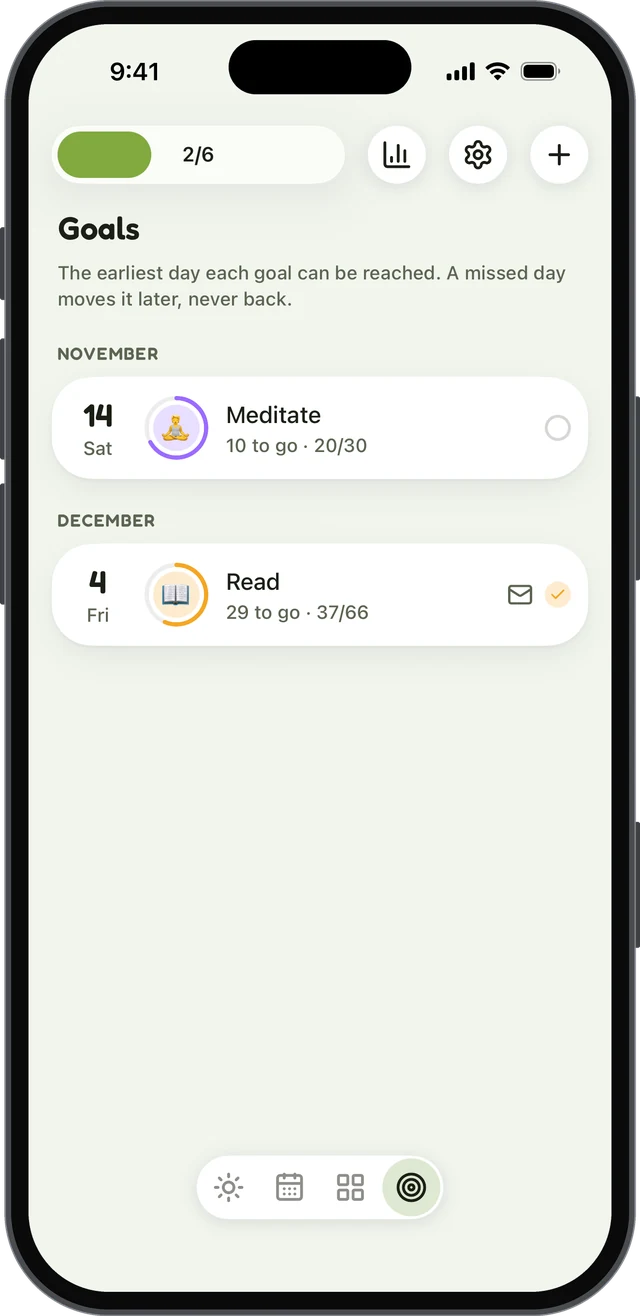
habitual answers the same problem with goals. You pick a number of days, say 30 or 66, and can count days you’ve already done as a head start. A missed day never takes days back; it only pushes the finish line out, and the earliest finish date is always shown. When you reach the goal, a letter to your future self, sealed while you worked towards it, opens.
Both approaches fit the research. In the best-known study of habit formation, which followed 96 people building a daily habit, missing a single day didn’t noticeably slow things down (more in what to do after a missed day). The same study found a median of 66 days for a habit to feel automatic, with a range from 18 to 254, which makes 66 days a sensible goal. More in how long it takes to form a habit.
Stats and charts
Loop is the stronger app for numbers, and it’s free. Its listing promises “detailed charts and statistics” and a complete history you can scroll back through, plus the habit strength score and streaks.
In habitual, every habit’s page has a grid of the days you did it, free. Stats come with Plus: days done over a week, month, 90 days or a year, current and longest streaks, time, and a monthly recap you can share. If deep charts are your favourite part of Loop, you’ll find less of that in habitual’s free version.
Platforms and switching phones
Loop runs on Android. habitual runs on iPhone and Android, and Plus can export and import your habitual data between them, so switching phones later isn’t a problem.
Coming from Loop, you can export your history to a spreadsheet (CSV) or a database file (SQLite) and keep it. If you want to bring that history with you, Table Habit, a free, open-source tracker that also runs on iPhone, says it can import Loop’s CSV export. habitual can’t import Loop’s files, so in habitual you start fresh. A clean start is also a chance to keep only the habits that still matter: pick up to three, and set a goal that counts the days you already did as a head start.
Which one should you use?
- On Android and happy with Loop? Stay. It’s free, open source, private and well made.
- Moving from Android to iPhone? Loop can’t come with you. Look for the same basics: no account, data on the phone, no ads. habitual has all three.
- On iPhone and curious about Loop? The App Store apps with “Loop” in their names aren’t the original. If what drew you to Loop was privacy and simplicity, habitual is built around the same idea.
- Using both an iPhone and an Android phone, or planning to switch? habitual runs on both.
Sources
- Loop Habit Tracker, official website: loophabits.org, checked 9 November 2026.
- Loop Habit Tracker on Google Play and F-Droid, checked 9 November 2026.
- Loop Habit Tracker, Frequently Asked Questions, GitHub, checked 9 November 2026.
- Lally, P., van Jaarsveld, C. H. M., Potts, H. W. W., & Wardle, J. (2010). How are habits formed: Modelling habit formation in the real world. European Journal of Social Psychology, 40(6), 998–1009.
- Table Habit, README and changelog, GitHub, checked 15 November 2026.
Questions
Is Loop Habit Tracker available on iPhone?
No. Loop’s official FAQ says there is currently no iOS version. It’s available for Android on Google Play and F-Droid. Apps on the App Store with “Loop” in their names are made by other developers.
Is Loop Habit Tracker free?
Yes. Loop is completely free and open source under the GPLv3 licence, with no ads and no in-app purchases. Every feature is available to everyone.
Does Loop Habit Tracker need an account?
No. Loop works offline and doesn’t ask you to register, and its Play listing says your habit data never leaves your phone. habitual works the same way: no account, and everything stays on the phone.
Can I move my Loop data to an iPhone?
Loop can export your data to a spreadsheet (CSV) or a database file (SQLite), so you keep a full record. There’s no official iPhone version to restore it into, but Table Habit, a free, open-source tracker that also runs on iPhone, says it can import Loop’s CSV export. habitual can’t import Loop’s files, so in habitual you’d start your habits fresh.
Keep reading
- Apps
Best Habit Tracker App for Android: 8 Options, Checked
The best habit tracker app for Android depends on what you need: free, no ads, no account, Wear OS or a game. Eight apps checked on their own pages. - Apps
Best Habitica Alternatives: 7 Habit Trackers, Checked
The best Habitica alternatives, whether you want to keep the game or drop it: seven habit trackers checked for platforms, pricing and accounts. - Apps
The Best Habit Tracker Apps, Compared Honestly
The best habit tracker app depends on your phone, your budget and your privacy. Seven popular apps compared on price, platforms, accounts and features.