
Apps
The Best App to Break Bad Habits: 8 Options, Checked
The best app to break bad habits depends on the habit. 8 quit trackers compared on price, privacy, accounts and what happens when you slip.
The best app to break bad habits depends on what you’re quitting. For smoking, a dedicated quit app such as Smoke Free or QuitNow! gives you the most support. For alcohol and other addictions, I Am Sober adds a community organised by addiction and milestone. For everyday habits like scrolling, snacking or biting your nails, a habit tracker that handles habits you’re quitting, such as habitual, Streaks or Table Habit, is usually a better fit.
Below are eight apps, what each is best for, its drawbacks, how you pay, whether it needs an account, and what happens when you slip. One thing to know up front: habitual is our app. We’ve included it where we think it honestly fits, and we say plainly where another app is the better choice.
Apps to break bad habits at a glance
| App | Best for | Platforms | Pricing model | Account |
|---|---|---|---|---|
| Quitzilla | Counting time and money saved on several habits | iPhone, Android | Free, with in-app purchases | None |
| I Am Sober | Alcohol and addiction recovery, with a community | iPhone, Apple Watch, Android | Free, with an optional subscription | Optional; needed for some features |
| habitual | Private tracking of habits you’re quitting and building | iPhone, Android | Free version that doesn’t run out; optional Plus upgrade | None |
| Smoke Free | Quitting smoking | iPhone, Apple Watch, Android | Free, with an optional subscription | Optional |
| QuitNow! | Quitting smoking, with a chat for ex-smokers | iPhone, iPad, Apple Watch, Android, Wear OS | Free with ads; optional subscription | Only for the community chat |
| Streaks | Cutting back on Apple devices | iPhone, iPad, Apple Watch, Mac, Vision Pro | One-time purchase | None |
| Habitica | Turning habits into a game | iPhone, iPad, Android, Wear OS, web | Free, with optional subscriptions and purchases | Uses a Habitica account |
| Table Habit | Free, open-source tracking on almost any device | Android, iPhone, iPad, Mac, Windows, Linux | Completely free, open source | None |
Prices and features checked on 12 November 2026. Apps change, so check the store listing before you rely on a feature.
What to look for in an app to break a bad habit
Most habit apps are built for adding habits: tick when you’ve done it. Breaking a habit works the other way round, and a few features matter more than usual.
It helps you watch for the habit
Bad habits run on cues: the same place, time or feeling sets them off (our guide on how to break a bad habit goes into this in detail). In two diary studies, Jeffrey Quinn, Wendy Wood and colleagues found that for strong habits, the strategy that worked best was vigilant monitoring: watching carefully for slip-ups and thinking “don’t do it” when the urge came. No other strategy they looked at helped with strong habits. A follow-up experiment suggested that monitoring didn’t weaken the habit itself; it helped people stop it in the moment.
So the best app is the one you’ll open every day, with reminders or check-ins that make you look at the habit, not one you set up once and forget.
It doesn’t punish a slip
Slips are common when you quit something, and what the app does next matters. Some restart a counter but keep your history, some break your streak, and one takes away your game character’s health. If seeing a zero is what makes you give up, choose an app that treats a slip as a moment, not a reset. We wrote more about this in what to do after a missed day.
It keeps a sensitive habit private
Habits people want to quit are often personal: drinking, smoking, gambling, porn, money. It’s worth reading an app’s privacy label before you write those down. On the App Store, each app shows a developer-reported “App Privacy” section saying what data is collected and whether it’s linked to you. We’ve noted what each label says below, and what to look for in a private habit tracker explains the questions to ask.
It fits the habit
A smoking app that counts cigarettes not smoked is great for smoking and useless for nail biting. A general habit tracker handles any habit, but won’t tell you how much money you’ve saved. Decide which you need before you choose.
How we chose
We started from the apps that come up when people search for an app to break bad habits or a quit tracker, in search results and in the app stores. We kept apps that are actively listed in the main stores and that clearly support quitting or cutting back, either as their main purpose or as a feature. Then we read each app’s official website and its App Store and Google Play listings on 12 November 2026 to check its platforms, pricing model, account requirements, privacy label and the features we mention. This is research from those sources, not months of hands-on testing, and we haven’t listed prices or star ratings, because they change often and vary by country.
We left out apps whose support for breaking habits we couldn’t confirm from official sources.
1. Quitzilla: best for counting time and money on several habits
Quitzilla is a quit tracker for iPhone and Android. You add a habit, such as alcohol, caffeine or sugar, and it shows how long you’ve gone without it, down to the second, along with the money and time you’ve saved.
What it does well:
- Milestones, statistics including your longest streak, a list of your reasons for quitting, and a diary.
- No sign-up. Its website says Quitzilla has no servers of its own, and the App Store privacy label says the data it collects isn’t linked to you. Its website also notes that on iPhone, its analytics record which habits you add, including the names you give your own.
- A relapse is handled kindly: it resets the current timer, but keeps your relapse history and statistics.
Drawbacks: the free version tracks up to two habits, and home-screen widgets need Premium. The free Android version shows ads. On iPhone it needs iOS 26 or later.
Price: free, with in-app purchases for Premium, including subscriptions and a lifetime option on iPhone.
2. I Am Sober: best for alcohol and addiction recovery
I Am Sober is a sobriety tracker built around a day counter, with a daily pledge and an end-of-day review. It also calculates money and time saved, shows a withdrawal timeline and lets you log urges and triggers.
What it does well: a community organised by addiction and milestone, so you can talk to people quitting the same thing. If you relapse, the current clock starts from zero, but, in its own words, nothing is erased and your full journey is kept.
Drawbacks: the free version tracks two habits; the Sober Plus subscription allows up to 10 and adds groups and cloud backups. You can use the app anonymously, but some features, such as the withdrawal timeline, need an account, and the community is for adults and needs age verification in some places, including the UK. Its App Store privacy label lists contact info, user content and identifiers among the data linked to you.
Price: free, with an optional Sober Plus subscription.
3. habitual: best for private tracking of habits you’re quitting
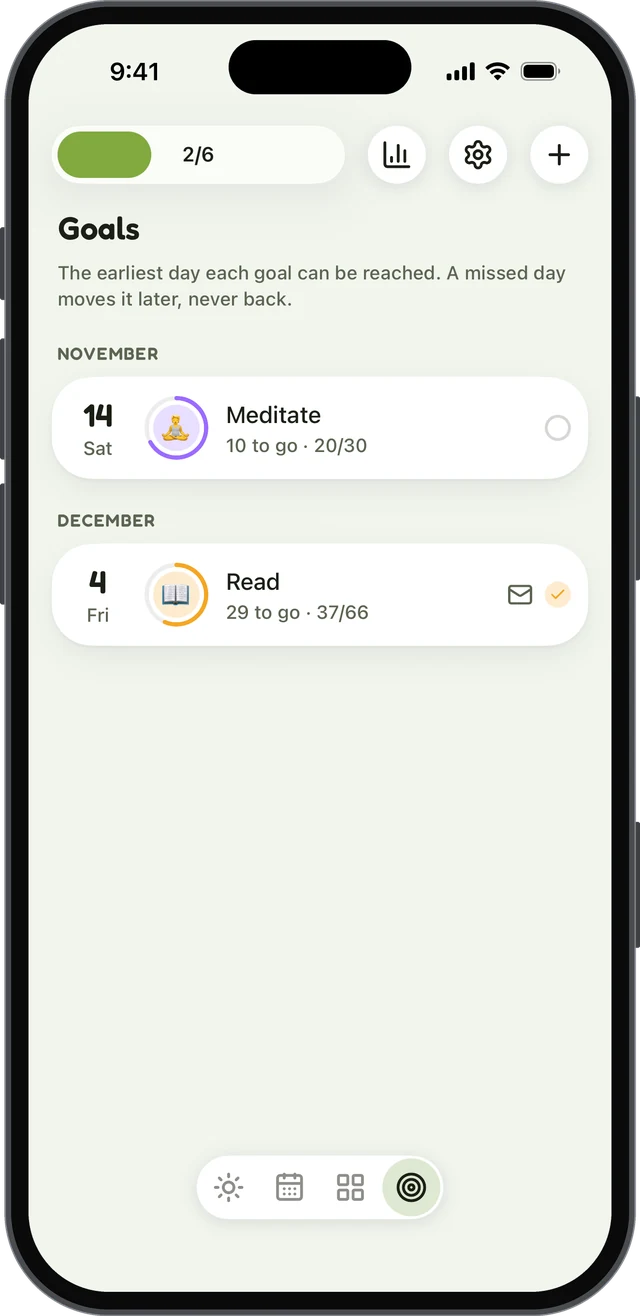
habitual is a habit tracker that keeps everything on your phone. There’s no account to make and no ads, it works offline, and it’s on both iPhone and Android. A habit can be counted, timed with a built-in timer, or something you’re quitting, so you can track “no phone in bed” next to “read 10 pages” in one place.
What it does well:
- Check-ins for quitting. Habits you’re quitting get their own reminders and check-ins, which suits the daily watching that research says helps.
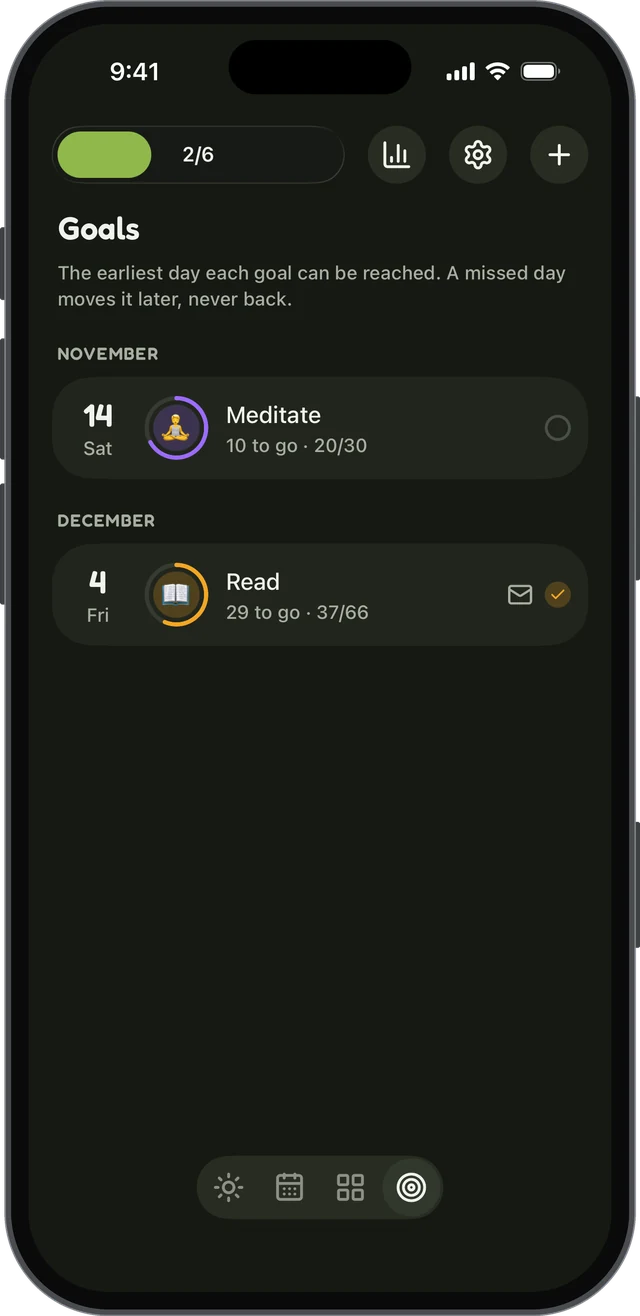
- Goals that only count up. Pick a number of days, such as 30 or 66. A missed day never takes days back; it only pushes the finish line out, and the earliest finish date is always shown.
- Letters to your future self, sealed until you reach the goal. It can help to write down why you’re quitting while the reason is fresh.
- Private by design. Your habits, notes and letters live only on the phone, with no server that keeps them.
Drawbacks: it’s a general habit tracker rather than a dedicated quit app, so it isn’t built around one substance the way Smoke Free is, and there’s no community. The free version stops at 3 active habits; stats, more than 3 habits, and export and import need Plus. There’s no sync between devices yet (it’s planned, and will be optional).
Price: free, with an optional Plus upgrade (yearly with a 7-day free trial, monthly, or lifetime).
4. Smoke Free: best for quitting smoking
Smoke Free is made for one habit: smoking. The free version shows how long you’ve been smoke-free, the money you’ve saved and the cigarettes you haven’t smoked, with tips for dealing with cravings.
What it does well: a cravings diary lets you log each craving, how strong it was and what helped. If you slip, you change your quit date, and its FAQ says your old data, such as diary entries and craving logs, is kept. The paid Pro version adds daily missions, an AI coach that helps you recover from a lapse, and a chatroom with advisor clinics.
Drawbacks: it’s for smoking only. Saving your data works best by linking an email or a Google, Facebook or Apple account. Its App Store privacy label lists health and fitness data, location and sensitive info among the data linked to you.
Price: free, with an optional Pro subscription.
5. QuitNow!: best for a community of ex-smokers
QuitNow! is another smoking app, available on more devices than most, including iPad and Wear OS. It shows how long it’s been since your last cigarette, how many you haven’t smoked, the money saved and the life regained, with 80 milestones and health indicators based on World Health Organization data.
What it does well: a chat with other ex-smokers and monthly live sessions with experts. You only need an account to send messages to the community.
Drawbacks: smoking only. The free version shows ads; the PRO subscription removes them. Its App Store privacy label says some data, including location and identifiers, may be used to track you.
Price: free with ads, with an optional PRO subscription.
6. Streaks: best for cutting back on Apple devices
Streaks is a habit tracker for Apple devices that you pay for once. It handles bad habits with what it calls negative tasks: each one starts the day as complete, and you mark it as missed if you do the thing you’re avoiding. You can also set a limit, such as a number of coffees a day or a week, and Screen Time habits help you cut back on your phone.
What it does well: no sign-up or login (it syncs through your iCloud), no ads, a full Apple Watch app, widgets and smart reminders, and you can share a habit with a friend.
Drawbacks: Apple only; it isn’t on Google Play. It holds up to 24 habits. And if you slip on a negative task, the day is marked as missed, so the streak breaks.
Price: a one-time purchase.
7. Habitica: best if a game keeps you going
Habitica turns habits, daily tasks and to-dos into a role-playing game. Bad habits go in as negative habits with a minus button, for things like smoking, doom scrolling or biting your nails.
What it does well: it gives you an instant consequence. Pressing minus costs your character health points, and parties and challenges with friends add accountability.
Drawbacks: that consequence cuts both ways. If your health reaches zero, you lose a level, all your gold and a piece of equipment, which motivates some people and puts others off. There’s no day counter or money saved, and its FAQ says it has no visual view of your data over time. It uses a Habitica account, and its Google Play listing says the app contains ads.
Price: free, with optional subscriptions and in-app purchases.
8. Table Habit: best free option across devices
Table Habit is a free, open-source habit tracker that runs on Android, iPhone, iPad and Mac, and on Windows and Linux too. It supports both positive and negative habits, with separate scoring for “do” and “don’t” habits.
What it does well: no ads, no in-app purchases, no sign-up and no telemetry, according to its project page; its App Store privacy label says no data is collected. It scores each habit over time with a growth curve, rather than relying only on a streak.
Drawbacks: it has none of the quit-specific tools in the apps above, such as a day counter, money saved or a cravings log, and its documentation doesn’t say how a slip affects a “don’t” habit’s score. Optional sync uses your own WebDAV storage, which is more technical than signing in.
Price: completely free.
The best app to break bad habits, by habit
- Quitting smoking: Smoke Free or QuitNow!, for the cigarette counts and support.
- Alcohol or another addiction: I Am Sober, for the community; Quitzilla if you’d rather not have an account.
- Everyday habits like scrolling, snacking or nail biting: habitual, Streaks (Apple only) or Table Habit, so the habit sits next to the ones you’re building.
- You want a game: Habitica.
- You want to spend nothing: Table Habit is completely free; Quitzilla and I Am Sober have free versions for two habits, and habitual’s free version, for up to 3, doesn’t run out. For more on paying once instead of subscribing, see our list of habit trackers without a subscription.
Whichever you choose, the app is a tool for the steps that do the work: knowing your cues, planning what you’ll do instead, and watching for the first moment of the habit.
When an app isn’t enough
A habit tracker can help with everyday habits. Dependence on alcohol, nicotine, gambling or drugs is different, and it deserves proper support. If a habit is harming your health, money or relationships, or you’ve tried to stop and can’t, talk to your doctor or a local support service. An app works well alongside that help, not instead of it.
Sources
- Quinn, J. M., Pascoe, A., Wood, W., & Neal, D. T. (2010). Can’t control yourself? Monitor those bad habits. Personality and Social Psychology Bulletin, 36(4), 499–511.
Questions
Is there an app to help break bad habits?
Yes, several. Quit trackers such as Quitzilla and I Am Sober count the time since you stopped and keep a record of slips, while habit trackers such as habitual, Streaks, Habitica and Table Habit let you track a habit you’re quitting alongside the ones you’re building. An app helps most when you use it to notice the habit as it starts, not just to count days.
What is the best free app to quit a bad habit?
If you want to pay nothing at all, Table Habit is free and open source with no ads or in-app purchases. Quitzilla and I Am Sober have free versions that cover two habits, and habitual’s free version, which doesn’t run out, covers up to 3 active habits with no account and no ads.
Do quit tracker apps reset when you relapse?
Most quit trackers restart the current counter but keep your history: Quitzilla, I Am Sober and Smoke Free all say your past data stays. In Streaks, a slip breaks the streak, and in Habitica it costs your character health. Goals in habitual only count up, so a missed day moves the finish line rather than taking days away.
Can tracking really help you stop a habit?
It can help, because it makes you watch for the habit. In two diary studies, Jeffrey Quinn and colleagues found that for strong habits, the strategy that worked best was vigilant monitoring: watching carefully for slip-ups and telling yourself not to do it. A tracker turns that watching into a daily routine.
Keep reading
- Apps
Best Habit Tracker App for Android: 8 Options, Checked
The best habit tracker app for Android depends on what you need: free, no ads, no account, Wear OS or a game. Eight apps checked on their own pages. - Apps
Best Habitica Alternatives: 7 Habit Trackers, Checked
The best Habitica alternatives, whether you want to keep the game or drop it: seven habit trackers checked for platforms, pricing and accounts. - Apps
Loop Habit Tracker for iPhone? How habitual Compares
Is there a Loop Habit Tracker for iPhone? Not officially. Here’s what Loop does well, and how habitual compares on iPhone and Android.