
Apps
Best Habit Tracker for ADHD: 7 Apps and Who Each One Suits
The best habit tracker for ADHD is one you’ll still open in week three. Seven apps compared on reminders, timers, missed days, price and privacy.
The best habit tracker for ADHD is the one you’ll still open in week three. For most people that means an app that is quick to log, reminds you at the right moment, and doesn’t punish a missed day so hard that you quietly give up.
Below are seven apps, each with what it’s best for, where it falls short, and how it handles the things ADHD can make harder: remembering, starting, and coming back after a missed day. One thing to know up front: habitual is our app. We’ve included it where we think it honestly fits, and we say plainly where another app is the better choice.
The best habit tracker for ADHD: the apps at a glance
| App | Best for | Platforms | Pricing model |
|---|---|---|---|
| Tiimo | A visual plan of your day | iPhone, iPad, Apple Watch, Mac, Android, web | Free, with a Pro subscription |
| habitual | Simple, private tracking that forgives missed days | iPhone, Android | Free, with an optional Plus upgrade |
| Finch | Gentle motivation from a virtual pet | iPhone, iPad, Android | Free core, with an optional subscription |
| Habitica | Turning habits into a game | iPhone, iPad, Android, web | Free, with an optional subscription |
| TickTick | Habits, tasks and a focus timer in one app | Almost every platform | Free, with a Premium subscription |
| Streaks | iPhone and Apple Watch, with Apple Health | iPhone, iPad, Apple Watch, Mac | One-time purchase |
| Loop Habit Tracker | Free, no-fuss tracking on Android | Android | Completely free |
Prices and features checked on 8 November 2026. Apps change, so check the store listing before you buy. If cost is the sticking point, our list of habit trackers without a subscription covers the free, open-source and pay-once options.
What makes a habit tracker work with ADHD
ADHD is linked with difficulties in action control, such as holding back a response you didn’t mean to make. That doesn’t mean habits are out of reach, but it does mean the tool matters more. A tracker that needs three taps, a login and a decision before you can log anything is a tracker you’ll stop using.
Here’s what we looked for:
- Logging in one or two taps, ideally from a widget, so there’s no time for your attention to wander off.
- Reminders that arrive when you can act on them, and that you can act on from the notification itself.
- A forgiving response to missed days. Some apps reset a streak to zero; others let you repair it, pause it, or simply keep counting. If a broken streak makes you want to delete the app, this matters most.
- Timers, for habits that are about time rather than ticks.
- Not too much at once. A long list of habits on day one is the fastest way to drop all of them.
How we chose
We started from the apps that come up again and again in search results, forums and app stores when people ask about ADHD, and kept the ones that are actively maintained and available in the main app stores. Then we read each app’s own website and its App Store and Google Play listings to check its platforms, pricing model, account requirements and features. This is research from those sources, not months of hands-on testing, and we haven’t listed star ratings because they change every week.
Habit trackers aren’t a treatment for ADHD. If you’re struggling, talk to your doctor; an app works best as one support among several.
1. Tiimo: best for a visual plan of your day
Tiimo is a visual planner rather than a pure habit tracker, and it says it was built by and for neurodivergent people. Its App Store listing says it was co-designed with ADHD and autism experts.
What it does well: your day is laid out as a visual timeline, so you can see what’s next instead of holding it in your head. There’s a focus timer with a calm countdown, timers on subtasks, routines, flexible scheduling, reminders, widgets and Live Activity timers, and an Apple Watch app. Its Pro plan adds AI that breaks a task into smaller steps.
Drawbacks: if all you want is to tick off three habits a day, a full planner may be more than you need. Custom widgets, the AI task breakdown and the web app are part of Pro. To use Tiimo on more than one device, you log in with the same email address.
Price: free, with a Pro subscription (the yearly plan has a 7-day free trial). Its App Store listing describes it as ad-free.
2. habitual: best for simple, private tracking that forgives missed days
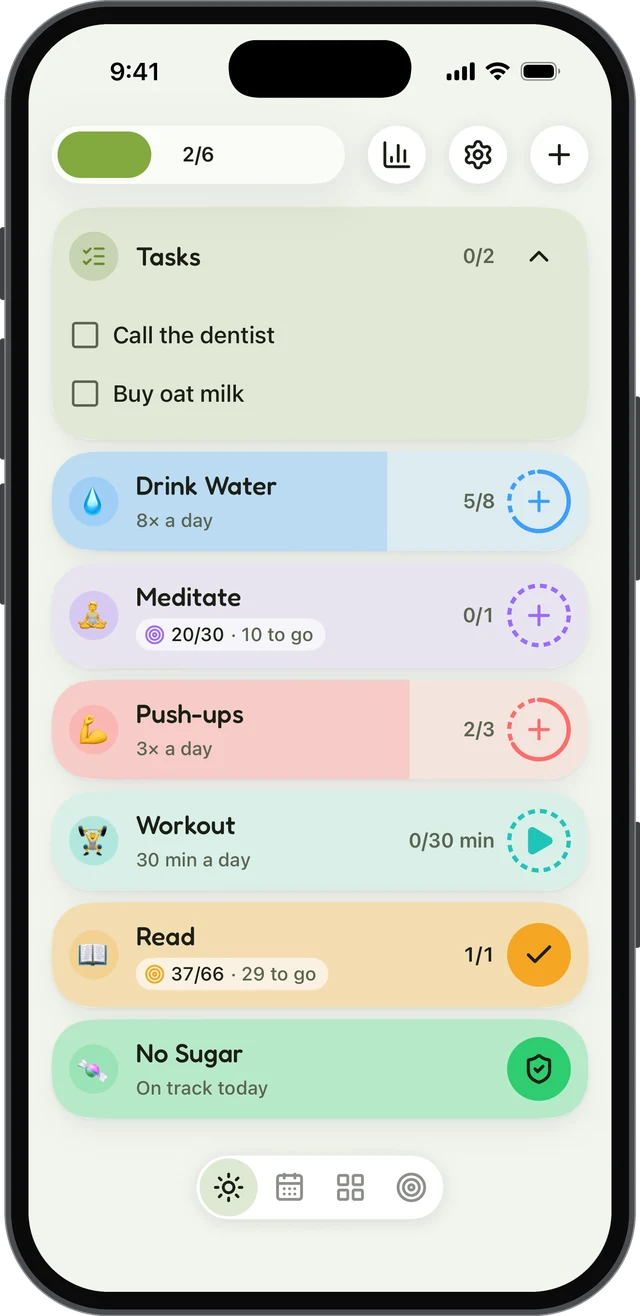
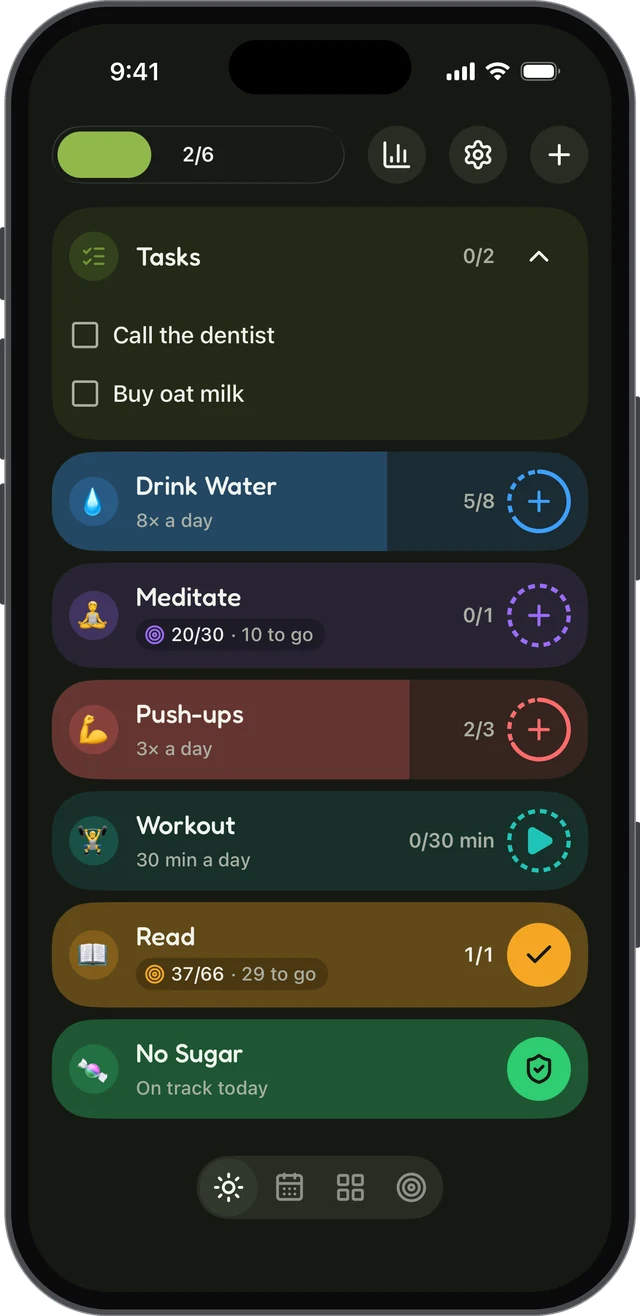
habitual is a habit tracker that keeps everything on your phone. There’s no account to make and no ads, it works offline, and it’s on both iPhone and Android.
What it does well for ADHD
- Logging in a tap, plus a home-screen widget that keeps your habits in view. A habit can be counted, timed with a built-in timer, or something you’re quitting, with reminders, and check-ins for the habits you’re quitting.
- Goals that only count up. Pick a number of days, like 30 or 66. A missed day never takes days back; it only pushes the finish line out a little, and the earliest finish date is always shown. There’s no streak to lose in one bad week.
- A free version that keeps things small. Up to 3 active habits, with logging, goals, reminders and the widget, and it doesn’t run out. For many people with ADHD, three is a better place to start than thirty.
- Letters to your future self, sealed until you reach a goal: a reason to come back that isn’t a number.
Drawbacks: there’s no visual day planner, so if your hardest problem is knowing what to do next, Tiimo fits better. There are no points, pets or levels either; if a game is what keeps you going, look at Habitica or Finch. And there’s no sync between devices yet (it’s planned, and optional).
Price: free, with an optional Plus upgrade for more than 3 habits, stats, more styles and widgets, and export and import. Plus is yearly with a 7-day free trial, monthly, or lifetime.
3. Finch: best for gentle motivation
Finch is a self-care app built around a small virtual pet that you look after by looking after yourself. If ticking boxes leaves you cold but looking after something keeps you coming back, it’s worth a try.
What it does well: goals and habits, a mood tracker, breathing exercises and timers, and a home-screen widget. Its streak is unusually forgiving: opening the app counts as a check-in, you can repair a missed day, and a pause mode freezes your streak when you need a break. All your data stays on your device unless you create a Finch account, which is optional.
Drawbacks: it’s a broad self-care app, so habit tracking is one part of it rather than the focus. If a pet feels like one more thing to look after, skip it.
Price: the core features are free; Finch Plus is an optional subscription with more customisation, timer lengths and prompts.
4. Habitica: best if games keep you going
Habitica turns your habits, daily tasks and to-dos into a role-playing game, with an avatar that earns gold, experience and pets. Both its store listings mention using it to help with ADHD.
What it does well: the game gives you an immediate reward for doing a habit, and parties and challenges with friends add accountability. Daily tasks can have flexible schedules, such as three times a week, and there are reminders and widgets.
Drawbacks: missed daily tasks cost your character health, which motivates some people and stresses others; you can pause this damage when you need to. The Android app contains ads. And if you don’t enjoy games, the swords and potions can feel like clutter between you and your habits. If that’s you, our list of Habitica alternatives has options with and without the game.
Price: free, with an optional subscription and in-app purchases.
5. TickTick: best for habits, tasks and focus in one place
TickTick is a to-do list app with a habit tracker and a Pomodoro-style focus timer built in. If switching between apps is where your day falls apart, keeping everything in one place helps.
What it does well: habits sit next to your tasks, calendar and focus timer, with reminders by time or by location, flexible repeating tasks, checklists and subtasks, and widgets. It syncs across phones, watches, computers and the web.
Drawbacks: with so much in one app, it can feel busy. The free version allows up to 5 habits.
Price: free, with a Premium subscription.
6. Streaks: best for iPhone and Apple Watch
Streaks is an Apple-only habit tracker that can complete habits for you from Apple Health and Screen Time, so a walk or a screen-time limit ticks itself off without you remembering to log it.
What it does well: smart reminders arrive around the time you usually complete a habit, and only if it isn’t done yet. There are timed habits, interactive widgets, a full Apple Watch app and flexible schedules. There’s no sign-up or login, no ads and no tracking; your data syncs through your own iCloud.
Drawbacks: in its own words, miss a day and your streak goes back to zero. If that kind of reset is what makes you give up, choose a more forgiving app. It’s only on Apple devices, and it holds up to 24 habits.
Price: a one-time purchase, with no subscription.
7. Loop Habit Tracker: best free tracker for Android
Loop Habit Tracker is free and open source, with no ads, no account and no internet connection needed.
What it does well: instead of a fragile streak, each habit has a habit score that shows its strength, so a few missed days after a long run don’t wipe out your progress. Reminders can be checked off or snoozed straight from the notification, and there are home-screen widgets and flexible schedules.
Drawbacks: it’s only on Android. The design is plain, and there are no timers, rewards or games.
Price: completely free.
How to choose: match the app to what trips you up
Make any habit tracker work better with ADHD
The app is half of it. These habits around the app matter just as much.
Track fewer habits than you think
Start with one to three habits, small enough to do on your worst day: one glass of water, one page, one minute of tidying. Add another only when the first ones happen without much thought. Our list of 60 habits to track has ideas and a way to pick your first three.
Turn each habit into an if-then plan
A plan in the form “when X happens, I’ll do Y” gives the habit a cue that does the remembering for you. In two studies with children with ADHD, Gawrilow and Gollwitzer found that adding an if-then plan to a goal helped the children hold back an unwanted response in a computer task, to the same level as children without ADHD. It was a lab task with children, not a habit study, but it suggests that simple plans like “When I put my mug down after breakfast, I’ll take my tablets” are worth trying.
Track it where you’ll see it
Tracking isn’t just record-keeping. A meta-analysis of 138 studies by Benjamin Harkin and colleagues found that monitoring progress made people more likely to reach their goals, and that the effect was larger when progress was physically recorded or shared with others. Put the widget on your home screen, or a printable habit tracker on the fridge.
Plan for the day you miss
You will miss days. What matters is what happens next. Decide now that a miss means “start again tomorrow”, not “start again from zero”, and choose an app that agrees with you. We wrote more about what to do after a missed day.
Sources
- Gawrilow, C., & Gollwitzer, P. M. (2008). Implementation intentions facilitate response inhibition in children with ADHD. Cognitive Therapy and Research, 32(2), 261–280.
- Harkin, B., Webb, T. L., Chang, B. P. I., Prestwich, A., Conner, M., Kellar, I., Benn, Y., & Sheeran, P. (2016). Does monitoring goal progress promote goal attainment? A meta-analysis of the experimental evidence. Psychological Bulletin, 142(2), 198–229.
Questions
What is the best habit tracker for ADHD?
There isn’t one best app, because ADHD shows up differently in different people. Tiimo suits people who need a visual plan of the day, Habitica and Finch suit people who are motivated by games or a pet, and habitual suits people who want a simple, private tracker where a missed day never wipes out their progress.
Do habit trackers help with ADHD?
They can help, but they aren’t a treatment. Research shows that monitoring progress makes people more likely to reach their goals, and that simple if-then plans helped children with ADHD hold back an unwanted response in a lab task. A tracker is one way to put both into practice.
Why do I keep giving up on habit trackers?
Common reasons are tracking too many habits at once, reminders that arrive at the wrong moment, and streaks that reset to zero after one missed day, which can make the whole thing feel lost. Start with one to three habits and choose an app that is forgiving about misses.
Is there a free habit tracker for ADHD?
Loop Habit Tracker is completely free and open source on Android. Finch’s core features are free, and Tiimo, Habitica, TickTick and habitual all have free versions with an optional paid upgrade. Streaks is a one-time purchase with no free version.
Keep reading
- Apps
Best Habit Tracker App for Android: 8 Options, Checked
The best habit tracker app for Android depends on what you need: free, no ads, no account, Wear OS or a game. Eight apps checked on their own pages. - Apps
Best Habitica Alternatives: 7 Habit Trackers, Checked
The best Habitica alternatives, whether you want to keep the game or drop it: seven habit trackers checked for platforms, pricing and accounts. - Apps
Loop Habit Tracker for iPhone? How habitual Compares
Is there a Loop Habit Tracker for iPhone? Not officially. Here’s what Loop does well, and how habitual compares on iPhone and Android.